Systems / Product Thinking · FlytBase · Live
Pilot Shift Scheduler
Drone fleets fly on a schedule that used to live in a spreadsheet and one manager's memory. This tool moved that job into software. Building the week went from 4 to 6 hours to about 15 minutes, with every assignment checked as it is made.
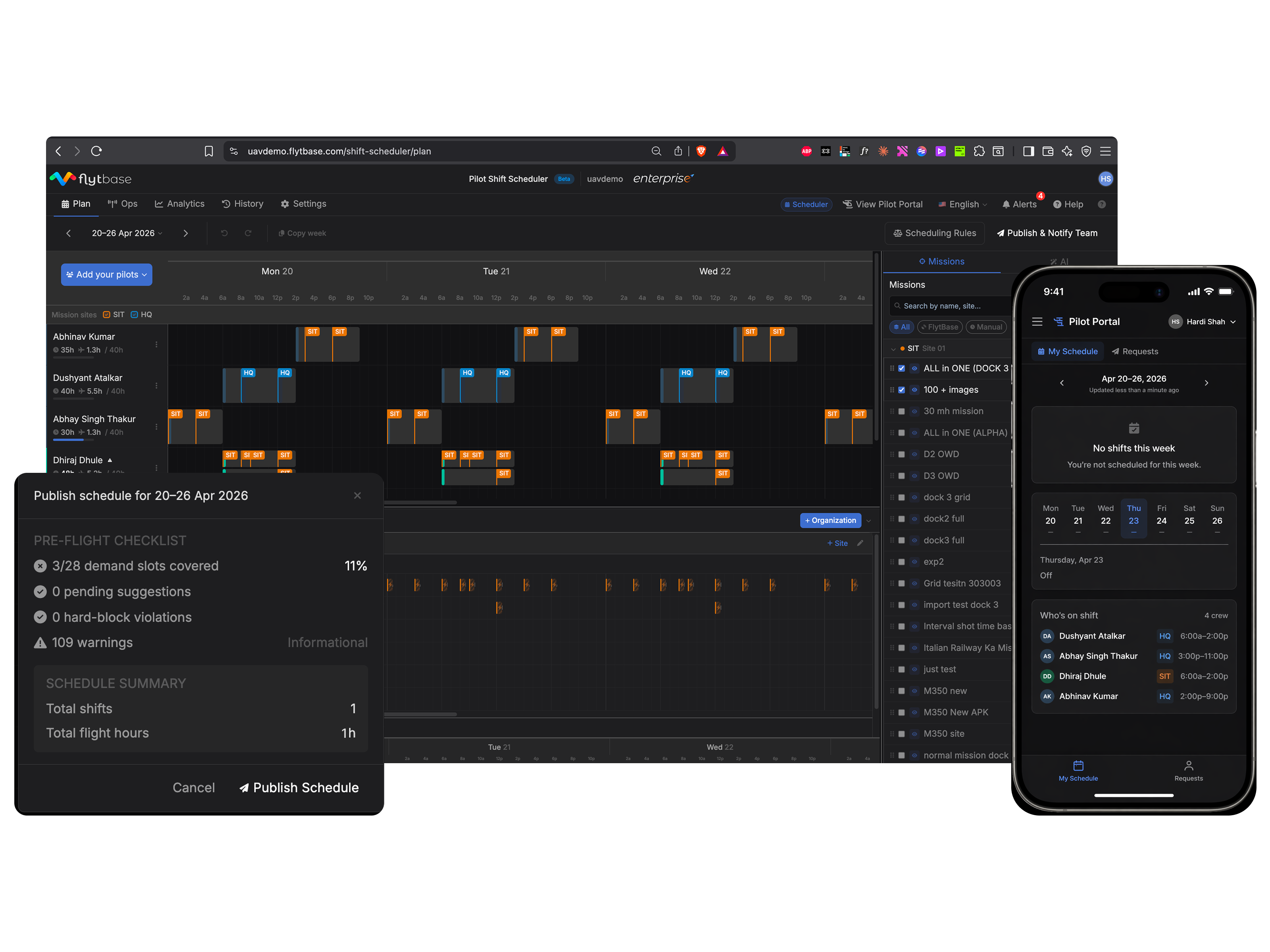

Scheduling rotating pilot teams across round-the-clock shifts was being done in spreadsheets.
Built a constraint-driven scheduler. Live, deployed, used every day.
01
The Problem
Scheduling drone operations is closer to scheduling airline flights than to filling in a staff roster.
Companies fly automated drone fleets over solar farms, railways, ports, and defense sites. One operations manager plans it all: who flies, what they fly, where, and when. Many of these sites are security sensitive. Clearances, inspections, and defense restrictions are mandatory and slow, and an unauthorized pilot over the wrong site is not a typo in a spreadsheet. It is a regulatory incident.
Picking a pilot for a single mission means checking six things at once: the right certification for that type of operation, availability at that hour, fit for the mission, clearance for the area being covered, a supervisor present when the flight goes beyond what the pilot can see, and enough rest since the last shift.
None of this checking was done by software. The spreadsheet stored the answers. The checking happened in the manager's head, every week, for every cell. When memory failed, the schedule shipped anyway, and the error surfaced at flight time.
"I spend Sunday evening building next week's schedule. Every week."Operations Manager · 9 sites, 7 pilots, 60+ flights per day
02
The Same Week, Twice
What scheduling one week looks like without the tool, and with it.
- 1Copy last week's sheet and start adjusting
- 2For each shift, recall who is certified, cleared, and rested. Nothing checks this
- 3Cross-check leave requests and rest gaps by hand
- 4Paste the schedule into WhatsApp and email threads
- 5A pilot calls in sick. Rebuild the affected days, resend everything
- 6A compliance question arrives. Dig through old files and hope
4 to 6 hours. Errors surface at flight time.
- 1Open the week. Recurring shift patterns are already laid out
- 2Drag shifts and missions onto the timeline. Every drop is checked against 16 rules as it lands
- 3Gaps and violations show up while building, not after
- 4Publish once. Every pilot sees their week in their own portal and gets notified
- 5A pilot calls in sick. Move their flights to another pilot, the rules re-check, publish the change
- 6History keeps every published schedule next to what actually flew
About 15 minutes. Errors surface at drag time.
03
The Principle
"Enforce compliance. Don't override judgment."
The person this is built for will not gamble on a new tool. A scheduling error at 6 a.m. on a Monday affects pilots, client sites, and contracts. One failed migration and they return to Excel permanently. That is the central design constraint of the whole project.
So the tool catches what nobody can hold in their head: certification gaps, rest violations, clearance mismatches, double bookings. But it never takes the scheduling decision away from the manager. That ruled out two obvious shapes immediately. Forms cannot show a full week of people, sites, and time at once. And full auto-generation overrides the judgment the manager spent years building. What ruled in: a timeline the manager builds on directly, with a rule engine watching every move.
04
Key Decisions
Three calls. Two were straightforward. One took the longest.
Auto-generate was built. Then killed.
The algorithm worked. Rule-passing schedules in seconds. It was pulled back because a generated schedule that overrides the manager's judgment does not earn trust, it triggers abandonment back to Excel. Auto-schedule now exists as an opt-in draft the manager can accept, reject, or override.
A timeline, not a form or a calendar.
The manager thinks across three axes at once: time (which windows need covering), people (who is available and certified), and sites (what each location requires). A form cannot show that. A generic calendar has no rule layer. A timeline with one row per pilot and time running left to right mirrors how they already think.
Violations inline, not at publish.
The first build showed violations only after the whole schedule was complete. Managers finished building and then met a cascade of warnings. Now every assignment is validated the moment it is made, inline on the affected block, with no popup in the way. The rule engine is a co-pilot, not a gatekeeper.
The 16 rules, exactly as they run in the product
| Rule | What it checks | On failure |
|---|---|---|
| CR-1 | Pilot booked on two shifts at the same time | Warning |
| CR-2 | A single shift longer than 14 hours | Warning |
| CR-3 | Pilot over 50 duty hours in a rolling week | Warning |
| CR-4 | Less than 10 hours of rest between shifts | Warning |
| CR-5 | Missing, expired, or expiring certification | Warning |
| CR-6 | Pilot not cleared for the site | Warning |
| CR-7 | A demand window with no pilot assigned | Warning |
| CR-8 | More simultaneous flights than the pilot's drone limit | Blocked |
| CR-9 | Drone limit set above the pilot's waiver level | Warning |
| CR-10 | Not enough battery for the mission and return | In progress |
| CR-11 | Two drones needing the same dock at the same time | Warning |
| CR-12 | A mission running past the end of the pilot's shift | Warning |
| CR-13 | Site coverage below what the client contracted | Warning |
| CR-14 | Pilot past the organisation's overtime threshold | Warning |
| CR-15 | Pilot has approved leave that day | Blocked |
| CR-16 | More than 5 consecutive working days | Warning |
Thresholds are editable per organisation. Only two rules block outright: a pilot on approved leave, and more simultaneous flights than a pilot is allowed to supervise. Everything else warns and lets the manager decide.
05
The Product
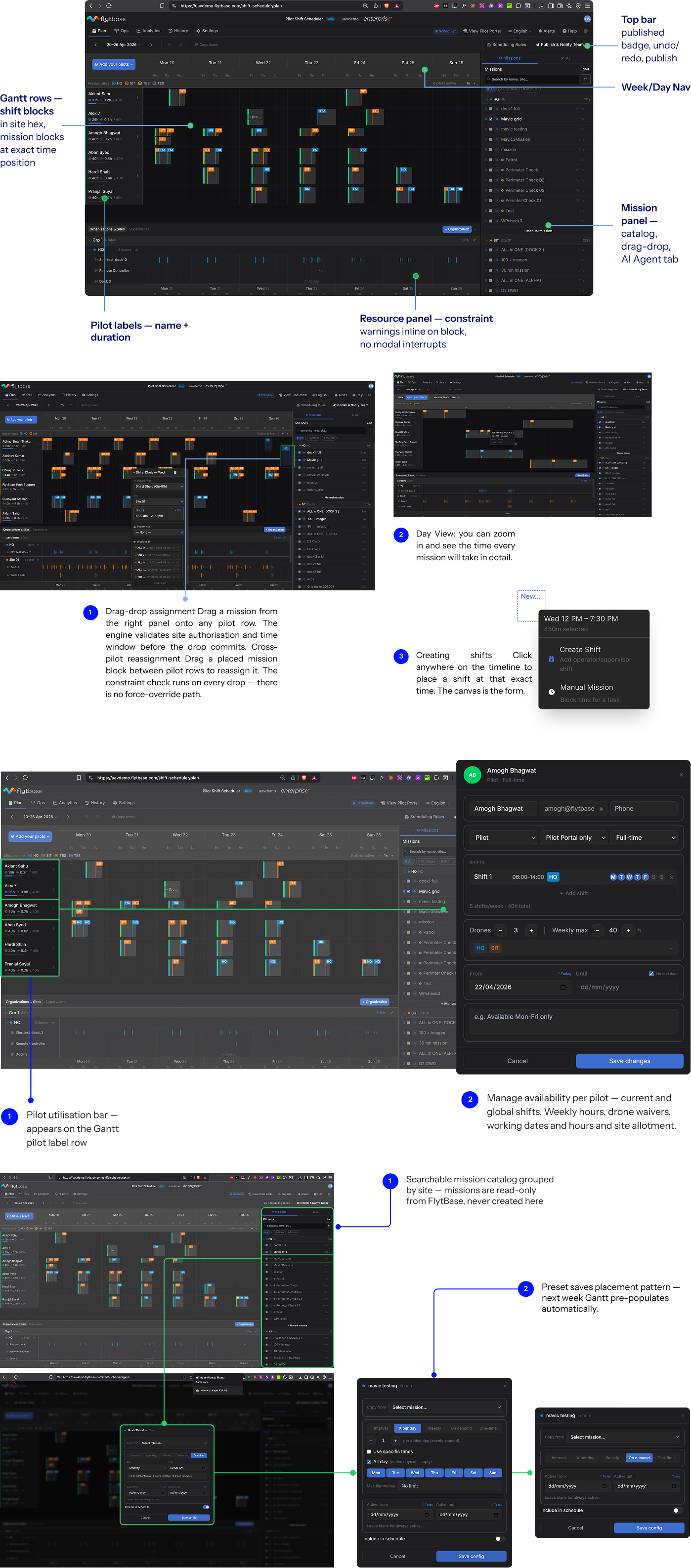
Five screens. Each one answers a question the spreadsheet could not.
| Screen | Question it answers | What's notable |
|---|---|---|
| Plan | How do I build this week's schedule? | The timeline canvas. Drag to create shifts, drag missions onto pilots, rules checked on every change, publish with pre-flight checks. What you see is what gets published. |
| Ops | What needs my attention right now? | Live view of the current day, plus disruption recovery for when a pilot drops out mid-week. |
| History | What was planned, what flew, can I prove it? | Every published schedule kept next to the flights that actually happened. The audit record a regulator asks for. |
| Analytics | Are we flying what we scheduled? | Actual versus scheduled, per pilot and per site. Unplanned flights surface automatically. |
| Pilot portal | When am I working and what am I flying? | Each pilot gets their own schedule view and leave requests on their phone. No more screenshots of spreadsheets in WhatsApp. |
Two details worth noting. There is no separate admin area: sites, pilots, missions, clients, and rules are all configured from inside the planner, where their consequences are visible. And the first run is a guided tour, twelve steps from adding the organisation to the first publish, so a new manager is never left staring at an empty canvas.
Functional mock: the interaction is real, the interface is simplified. The shipped product looks a little different.
06
What I'd Change
One thing discovered in use, and one thing still owed.
Publishing a schedule is not the same as delivering it.
The first build assumed that once a schedule was published, the job was done. A customer flagged that pilots were still missing updates buried in WhatsApp threads. The fix was twofold: notifications became part of the publish flow itself, and pilots got their own portal so the schedule lives where they look, not where the manager last pasted it.
One rule is still a promise.
CR-10, the check that a drone has enough battery for the mission and the return trip, is defined but waiting on live battery data from the platform. Until that arrives it stays visibly marked as in progress rather than pretending to work. A rule engine earns trust the same way a person does: by not claiming checks it has not done.