Systems / Product Thinking · FlytBase · Live
Weather Intelligence
Fleet-wide weather intelligence built inside FlytBase: every drone site gets a GO or NO-GO verdict at flight altitude, without leaving the platform.
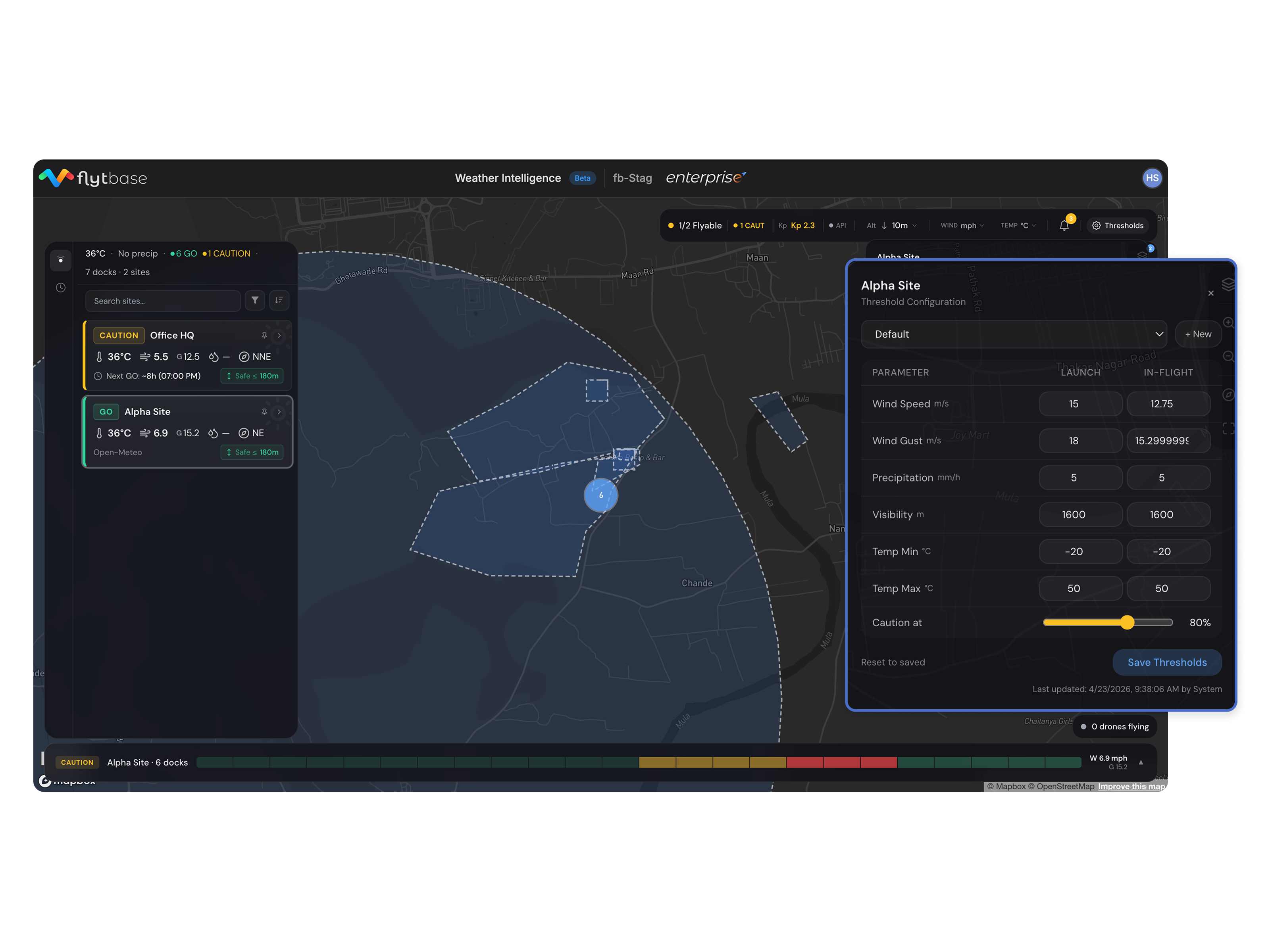

Drone operators checked weather in three separate apps before every flight. No verdict. No record. No fleet view.
Built a fleet-wide weather readiness tool inside FlytBase. One GO or NO-GO per site, per drone.
01
The Problem
Before a drone takes off, one question has to be answered: is it safe to fly? Wind, rain, and temperature all determine whether a mission can complete safely. FlytBase, the platform these operators use to manage their fleets, had no built-in way to answer that.
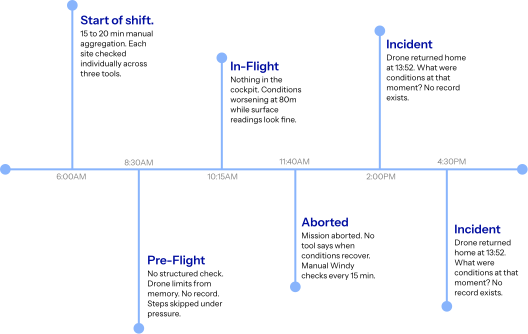
Before every flight window, operators opened a second screen and checked a weather app for each site one by one. A solar farm can span 20 kilometres with multiple launch docks. A railway operator might manage four separate segments at once. Three to five minutes per site, every time, with no record of what was seen and no way to view all sites together.
The two tools operators relied on were UAV Forecast and Windy. Both show altitude-specific wind data. But UAV Forecast updates every two hours and locks key features behind a paid tier. Windy shows detailed wind layers but takes several minutes to read and interpret before every flight. Neither gives a verdict: just data that the operator still has to manually judge against their drone's limits.
02
Existing Tools
UAV Forecast and Windy both exist. Neither was built specifically for fleet operations inside a drone platform.
| Capability | UAV Forecast | Windy |
|---|---|---|
| Altitude-specific wind data | ✓ | ✓ |
| Real-time updates (not 2-hr cache) | × | ✓ |
| Full access, free | × | ✓ |
| Flight verdict (GO / NO-GO) | × | × |
| All sites on one screen | × | × |
| Quick to read, no interpretation needed | × | × |
| Built into FlytBase | × | × |
| Record of checks for compliance | × | × |
03
The Solution
A flink that pulls site and dock locations directly from FlytBase and gives each one a single verdict: fly now, or wait.
FlytBase already had every site and dock coordinate. The flink connects to that data directly. Operators don't need to configure anything. The map renders every location on load with a live GO or NO-GO for each dock.
The verdict is altitude-aware. Open-Meteo provides wind data at 10m, 80m, 120m, and 180m above ground. Selecting an altitude in the header re-evaluates every site across the fleet instantly. Dock sensors always override the forecast; METAR fills in when the sensor is offline. The active source is always shown.
04
Key Decisions
Three decisions that shaped the product.
One screen. No tabs.
Operators monitor continuously. If a site flips from GO to NO-GO while they're on another tab, they miss it. Every feature (live status, 24h forecast, threshold settings, alerts) lives on one surface.
Altitude first.
Existing tools show surface wind. Drones fly at 80m, 120m, and 180m above ground, where conditions differ. The altitude selector re-evaluates every site across the whole fleet in one action.
The system informs. The operator decides.
No weather condition ever triggers an automated drone action. A false alert mid-flight is not a software glitch: it is a safety and regulatory event. The system gives the operator the information to decide.
05
The Product
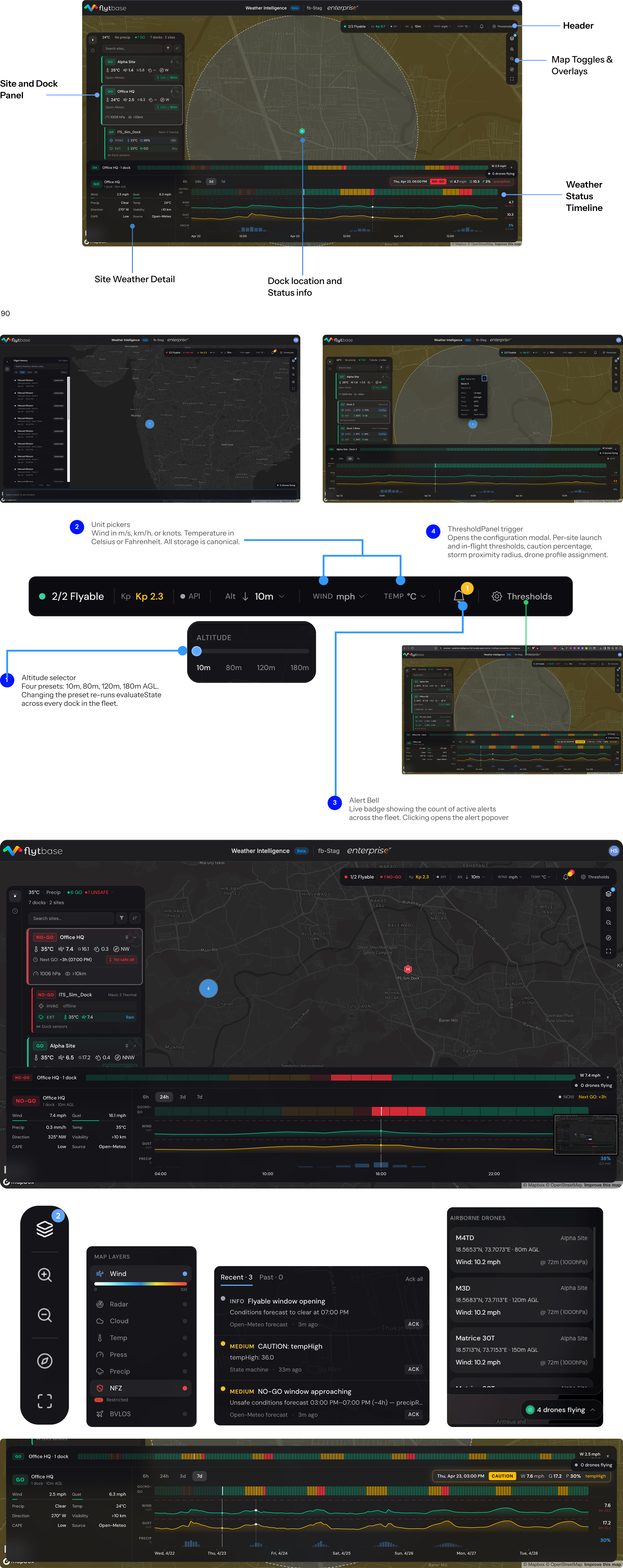
One screen. All sites. Every answer without switching apps.
| Feature | What it answers |
|---|---|
| Fleet map | Which of my sites can fly right now? What does the wind look like across locations? |
| Site panel | Why is this site blocked? Which condition is out of range? |
| Altitude selector | What changes if I fly at 80m instead of 120m? Updates every site instantly. |
| 24h timeline | When will this site be safe to fly? Shows hourly verdict for the next day. |
| Mission replay | What were conditions during a specific past flight? Historical weather maps to each logged mission. |
| Live drone view | A drone is in the air. What are conditions at its current position and altitude right now? |
Open-Meteo is called once per site on load and cached for an hour, covering the next 15 days of hourly forecasts. For a 10-site fleet, that is around 650KB of data on load. The app does not re-fetch unless the cache expires, keeping it cost-efficient across development and production.
Functional mock: the interaction is real, the interface is simplified. The shipped product looks a little different.
06
What I Got Wrong
Three assumptions the first build made incorrectly.
"When will it clear" needed to be where NO-GO was.
The forecast window was buried one click away in a detail panel. Operators were not going in. The answer moved to the same level as the NO-GO verdict, visible in the site card and timeline without any navigation.
Source transparency had to be explicit.
The first build showed a GO verdict without showing where the reading came from. A live dock sensor, an airport weather report, and a forecast carry very different confidence levels. The active source is now always labelled. When a sensor goes offline, the fallback is clearly shown.
Alerts needed to be proactive, not reactive.
Early alerts only fired when a threshold was crossed. Operators monitoring multiple sites needed warning before conditions changed. A forecast detector was added: it fires when a blocked site has a clear window opening, so operators know before they have to check.
Skills and tools used
- Product Design
- UX Research
- User Interviews
- Information Architecture
- Interaction Design
- Data Visualization
- Fleet Management UX
- Drone Operations Design
- Weather Data Integration
- FlytBase Platform
- Mapbox
- Open-Meteo API
- Next.js
- TypeScript
- Figma
- End-to-end product design
- 0 to 1 product development